
TypeMotion.Art
Guide · real product workflow

Kinetic Typography Without After Effects

Make kinetic typography in the browser when you do not want an After Effects project. Start from a template, replace the words, and export.

Open Kinetic Typography Templates

Make a three-word kinetic title in the browser

Open the template for this walkthrough
  1. 01

    Open Glide. You do not import an After Effects project.

  2. 02

    Replace the sample list with PLAN, CREATE, and SHARE.

  3. 03

    Preview one full cycle and shorten any word that leaves the frame.

  4. 04

    Export the loop and drop that file into your edit. The template does not run inside After Effects.

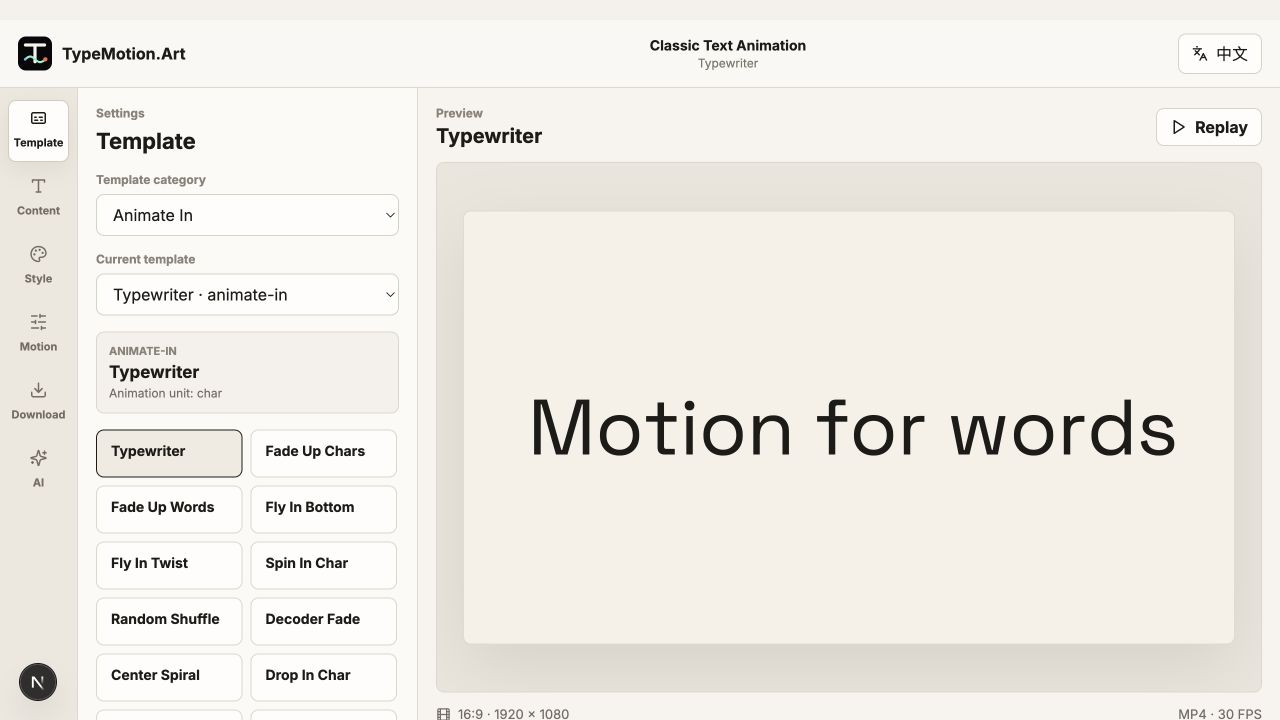
Kinetic Text workspace reference
Actual product UIEditor workspace referenceWorkspace overview; controls and preview vary with the selected template.
01

What you can do without a desktop project

Glide, stretch, glitch, scramble, and looping text are already built as templates. You replace the words, set color and timing, and preview the cycle. You do not get a layered After Effects composition, expressions, or a plugin install.

02

Worked sequence: three beats

Open Glide and use PLAN, CREATE, SHARE. Keep the words a similar length so the motion does not jump. If one word is the point of the clip, switch to the stretch text animation and give that word the frame.

03

When After Effects is still the right tool

Use a desktop composition when the type has to track footage, respond to audio, or match an existing project file. Use the browser templates when the deliverable is a title, list, or loop you can export on its own.

Questions

Can I make kinetic typography without After Effects?

Yes. Open a kinetic typography template, replace the sample words, and preview the motion in the browser. There is no project file to install.

Does this replace an After Effects template?

It replaces the cases where the type is the whole graphic. It does not edit your existing After Effects composition or run as a plugin inside it.

Which template is closest to a title animation?

Start with Glide for a short list, stretch text for one emphatic word, and a typewriter reveal when a full sentence has to stay readable.

Try it

Templates used in this guide

Each link opens the working SaaS editor rather than a decorative demo card.

Apply the workflow

Related use cases

Keep reading

Related guides